


mydlink
3.65.05K Reviews
App Specs
- Version
- 2.17.0
- Updated On
- License
- Free
- Downloads
- 1,000,000+
- Developer
- D-Link Corporation
- Categories
- Productivity
- Platform
- Android, iOS
Screenshots
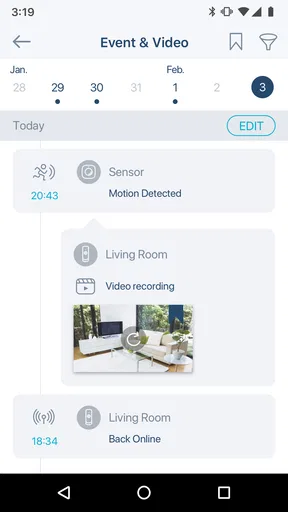
 Analysis by AppCompare
My first recommendation is to treat mydlink as a remote control for a particular D-Link setup, not as a universal smart-home hub. That distinction matters: the app is most useful when the devices you already own are supported and you want one place to check them, rather than when you are choosing a platform for a mixed collection of brands. I find that expectation makes the day-to-day experience easier to judge.
Build a dependable everyday routine
A practical starting point is to decide what you actually need to check when you are away. For one household, that may be a quick camera view before letting a delivery sit outside; for another, it may be checking a room or making sure a connected plug is operating as intended. Keeping the routine narrow helps the app feel like a useful tool instead of another screen to monitor constantly.
For a realistic workday workflow, I would check the live view only when there is a reason, then use a motion alert as a prompt to look closer rather than as proof that something is wrong. Movement can have ordinary explanations, and repeated alerts can become background noise if every event gets the same attention. A sensible habit is to review the relevant moment and then return to the rest of the day.
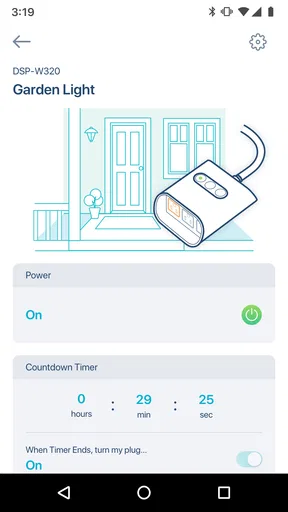
Schedules can reduce small recurring tasks, such as switching a compatible device at a regular time. I would start with one simple schedule and observe whether it matches the household’s routine before building more around it. A schedule is only helpful when the time still makes sense on weekends, during a change in plans, or when someone is home unexpectedly.
Check the details before relying on alerts
Before depending on notifications, I would review which device is expected to send them and what kind of event should prompt a check. This is a more useful approach than enabling every alert and hoping the important one stands out. If a notification arrives while you are busy, a clear personal rule—such as checking only alerts that match a particular room or time—can keep the app from interrupting you unnecessarily.
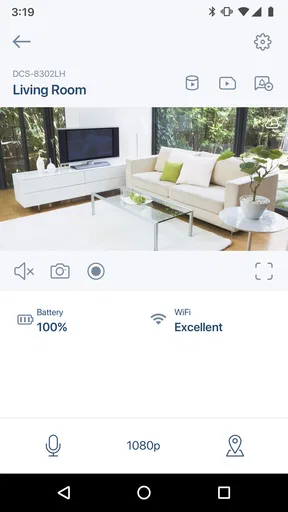
There is also a practical difference between a live view and recorded footage. Live viewing answers what is happening now; playback is for looking back at an event you did not see at the time. If you expect to use recordings for a particular reason, check that the relevant device and recording setup suit that purpose before assuming every moment will be available to review.
Privacy deserves a routine of its own. If you use the privacy mode described in the app, make it part of a deliberate at-home habit rather than something you switch on once and forget. That can help balance the convenience of remote viewing with the comfort of not monitoring a space when you are using it yourself.
Worth Reading Before You Choose

EA SPORTS FC Mobile 26 Is a Bigger Football Game, but It Takes Time

Flipboard Shows What News Apps Must Do Beyond the Feed

Switching to Android Auto Means Rethinking Your Driving Routine

Google Calendar Makes a Crowded Week Easier to Manage

Ludo King Makes the Most of the Minutes Between Plans

Baby Panda World Brings Quick Play to Modern Phones, but Its Game Library Feels Busy
Make common actions easier to remember
The most useful shortcut may be a repeatable habit rather than a hidden setting. For example, I would check the camera before leaving, confirm that the intended schedule is active, and then avoid reopening the app unless an alert gives me a reason. A consistent sequence makes it less likely that remote access turns into anxious, repeated checking.
Voice control through Alexa or Google Assistant can be handy when you already use those assistants and the relevant devices work with the setup. I would treat voice commands as a convenience for ordinary control, not as a replacement for checking the app when the result matters. If a command does not produce the expected outcome, the app remains the more direct place to inspect the device.
For a household with more than one person, it is worth agreeing on who handles alerts and schedules. Otherwise, one person may change a routine while another expects the old one to remain in place. This is not a special feature; it is a simple coordination habit that prevents a connected setup from becoming confusing.
Know where this approach has limits
This app is a better fit for people who are already invested in compatible D-Link devices than for someone who wants a single controller for equipment from many manufacturers. A broad smart-home platform may be a better choice if cross-brand routines are the main goal. Likewise, if you only need occasional camera viewing and prefer a device maker’s simpler single-camera tool, a wider device-management app may feel like more than you need.
Connectivity is another part of the experience to keep in mind. Remote viewing and notifications depend on the devices and network being available, so I would not treat an app alert as a substitute for a physical check or a dedicated alarm system where that is important. The app can make it easier to stay informed, but it cannot remove the ordinary limits of a connected home.
There can also be a trade-off between convenience and attention. More cameras, schedules, and alerts may offer more control, but they can also create more decisions. I would add devices to the workflow one at a time and keep only the notifications that genuinely change what I do. That keeps the app useful without turning it into a steady stream of interruptions.
On Android, the app is listed for devices running version 8.0 or later. It is free to download, though in-app purchases are offered, with listed items ranging from $0.99 to $199.99. I would check the purchase details that apply to the particular device or service before assuming the basic download covers every capability I have in mind.
Getting Started with mydlink
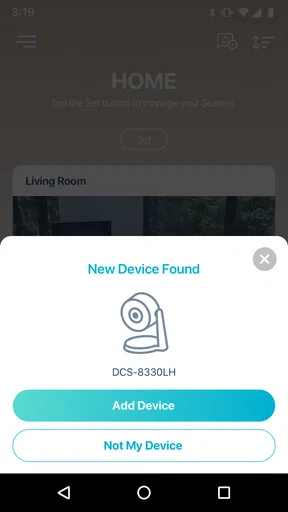
Setting up mydlink is a breeze. The app is available on both Android and iOS, so no one's left out of the fun. Once you download it, you’re greeted with a clean interface that walks you through connecting your D-Link devices. Whether you have cameras, smart plugs, or any other supported devices, the app makes the pairing process straightforward. Trust me, I’m not the most tech-savvy person, and even I managed to get it all up and running without a hitch.
Features That Stand Out
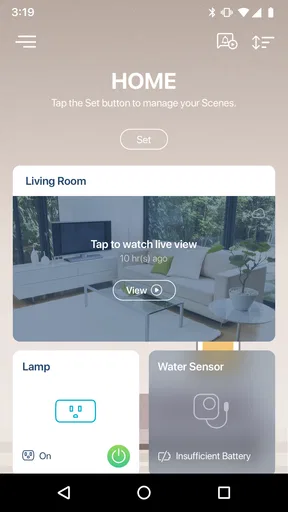
Now, onto the features – this is where mydlink shines. First off, the live view is a game changer. You can watch real-time footage of your home, and the video quality is surprisingly crisp. There’s also the option to playback recorded footage, which is fantastic if you need to review something you missed.
Another feature I love is the scheduling option. You can set your devices to turn on or off at specific times. It’s like having a virtual butler! Plus, the app supports voice commands with Alexa and Google Assistant, which means you can control your devices without even lifting a finger. Fancy, right?
User Experience
The user experience is pretty smooth overall. The app is intuitive, and the navigation doesn’t feel clunky. I particularly appreciate the alerts and notifications system. Whenever there’s motion detected, you get a prompt notification. It’s reassuring to know that if anything unusual happens, you’ll be the first to know.
I also found the customer support feature quite helpful. There’s an in-app chat option that connects you directly with support staff. I had a minor hiccup with one of my devices, and the response was prompt and effective. It’s nice to see that they have your back.
Security and Privacy
When it comes to security, mydlink doesn’t disappoint. The app uses encryption to protect your data, and you can enable two-factor authentication for added peace of mind. In a world where privacy concerns are ever-growing, knowing that your information is secure is a huge relief.
There’s also a privacy mode option, which lets you disable live streaming and notifications when you're at home. It’s a thoughtful touch for when you just want some uninterrupted personal time.
Final Thoughts
So, is mydlink worth it? In my opinion, absolutely. It offers a robust suite of features that cater to both tech enthusiasts and average users. The peace of mind it provides is invaluable, and the ease of use makes it accessible to everyone.
If you’re in the market for a reliable and user-friendly home security app, give it a shot. I was genuinely impressed, and I think you will be too. Whether you’re at work, on vacation, or just out grabbing coffee, knowing your home is secure is a big win in my book.
Who I would recommend it to
D-Link Corporation’s productivity app makes the most sense for people who want to manage compatible devices from the same ecosystem without opening separate controls for each one. It has more than a million installs and an average rating of 3.6 from around 62,000 ratings, so it is widely used, although that rating also suggests that experiences are not uniformly smooth. I would use those figures as context, not as a substitute for checking whether my own devices fit the app.
It is less compelling if you are starting from scratch and your priority is choosing a system that can bring together many brands. In that case, I would compare device compatibility and the specific routines each platform supports before buying hardware. The convenience of a single app is real only when the devices you need can actually be managed through it.
What to expect over time
The app’s current version is 2.14.0, and it was released on January 26, 2018. I would keep the app and device software current, then revisit schedules and notification choices after household routines change. A setup that was sensible during a normal workweek may need adjusting during a holiday or a change in who is at home.
It is rated for Everyone, which describes its content rating rather than guaranteeing that every setup is effortless for every user. The useful question is whether you are comfortable pairing devices, interpreting alerts, and maintaining a few routines. If that sounds manageable, the central appeal is straightforward: D-Link devices can be checked and controlled from one place, with live viewing and scheduling available where supported.
My overall view is positive, with a clear condition: choose it because it suits your D-Link devices and the way you want to manage them, not because you expect a universal control center. I would keep the setup simple, make alerts purposeful, and use schedules for genuinely repeatable tasks. For that kind of measured, everyday control, it is a practical option; for a mixed-brand home or a need for more specialized security tools, I would look at alternatives first.
Pros
- User-friendly interface for easy navigation.
- Real-time notifications for instant alerts.
- Supports multiple device connections.
- High-quality video streaming capabilities.
- Secure login with two-step verification.
Cons
- Limited free features; premium required.
- Occasional connectivity issues reported.
- Initial setup can be time-consuming.
- Some features locked by region.
- App size may be large for older devices.
FAQs for mydlink
What is mydlink and what can it do for me?
mydlink is a comprehensive app designed to help you manage and monitor your D-Link smart devices, such as cameras, routers, and smart plugs, from anywhere with an internet connection. It offers features like live video streaming, device scheduling, and push notifications to keep you informed about what's happening at home.
Is mydlink compatible with all D-Link devices?
mydlink is compatible with a wide range of D-Link devices, but not all. It's essential to check the compatibility list on the D-Link website or within the app to ensure your specific devices are supported. This ensures you can fully utilize all features offered by the app.
How secure is mydlink in terms of protecting my data?
mydlink prioritizes user security by employing encryption protocols to protect your data during transmission. The app also offers features like two-factor authentication and password protection to enhance security. Users should regularly update the app to benefit from the latest security enhancements.
Can I use mydlink on multiple devices simultaneously?
Yes, mydlink supports use on multiple devices, allowing you to monitor and control your smart devices from different smartphones or tablets. This is convenient for families or households where multiple members need access to the app's features. Ensure each device is logged in with the same account credentials.
Does mydlink require a subscription for full functionality?
mydlink offers a variety of features for free, but some advanced functionalities, like extended cloud video storage, may require a subscription. Users can choose from different plans based on their needs, allowing flexibility in how they utilize the app's capabilities.


